
coderwhy课程笔记(5)
JSX的本质和原理:
div -> React.createElement(“div”, {class, id}, [children]) 最终形成一个树结构,一棵虚拟DOM树
即 jsx只是React.createElment(comonent, props,…children)函数的语法糖。component是当前元素类型,标签/组件名,
props: 属性集合,children: 存放在标签中的内容,以children数组的方式存储。
<!doctype html>
<html lang="en">
  <head>
    <meta charset="UTF-8" />
    <meta name="viewport" content="width=device-width, initial-scale=1.0" />
    <title>Document</title>
  </head>
  <body>
    <script src="https://unpkg.com/react@18/umd/react.development.js"></script>
    <script src="https://unpkg.com/react-dom@18/umd/react-dom.development.js"></script>
    <div id="root"></div>
    <script type="importmap">
      {
        "imports": {
          "react": "https://esm.sh/react@18",
          "react/jsx-runtime": "https://esm.sh/react@18/jsx-runtime",
          "react/jsx-dev-runtime": "https://esm.sh/react@18/jsx-dev-runtime"
        }
      }
    </script>
    <script type="module">
      import { jsx as _jsx, jsxs as _jsxs } from "react/jsx-runtime";
      class Demo extends React.Component {
        render() {
          return /*#__PURE__*/ _jsxs("div", {
            children: [
              /*#__PURE__*/ _jsx("div", {
                className: "header",
                children: /*#__PURE__*/ _jsx("h1", {
                  children: "Header",
                }),
              }),
              /*#__PURE__*/ _jsxs("div", {
                className: "main",
                children: [
                  /*#__PURE__*/ _jsx("div", {
                    children: "Banner",
                  }),
                  /*#__PURE__*/ _jsx("div", {
                    children: /*#__PURE__*/ _jsxs("ul", {
                      children: [
                        /*#__PURE__*/ _jsx("li", {
                          children: "Item1",
                        }),
                        /*#__PURE__*/ _jsx("li", {
                          children: "Item2",
                        }),
                        /*#__PURE__*/ _jsx("li", {
                          children: "Item3",
                        }),
                        /*#__PURE__*/ _jsx("li", {
                          children: "Item4",
                        }),
                      ],
                    }),
                  }),
                ],
              }),
              /*#__PURE__*/ _jsx("div", {
                className: "footer",
                children: /*#__PURE__*/ _jsx("h1", {
                  children: "Footer",
                }),
              }),
            ],
          });
        }
      }
      const root = ReactDOM.createRoot(document.querySelector("#root"));
      root.render(/*#__PURE__*/ _jsx(Demo, {}));
    </script>
  </body>
</html>
render函数的作用:协调(reconciliation), 将虚拟DOM和真实DOM同步起来。
这种方式叫做声明式编程,只需要告诉react你希望UI是什么状态,不需要真实的操作UI。
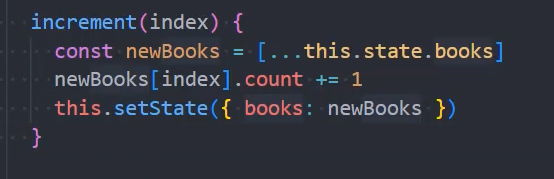
react里修改state的标准做法:
react脚手架
PWA: Progressive Web App, 渐进式WEB应用。先通过Web技术编写出一个网页应用,随后加上App Manifest和Service Worker(离线缓存)来实现PWA的安装和离线等功能。这种Web存在的形式,也称为web app。指的是可以在手机(Android chrome中)上添加为桌面图标。实现了消息推送。
